

 2 days ago
4
2 days ago
4
Motorists in Metro Manila can check possible No Contact Apprehension Policy (NCAP) violations online through official government portals. These systems let registered vehicle owners review traffic violation records, verify notices, and access payment or contestation procedures without visiting a government office.
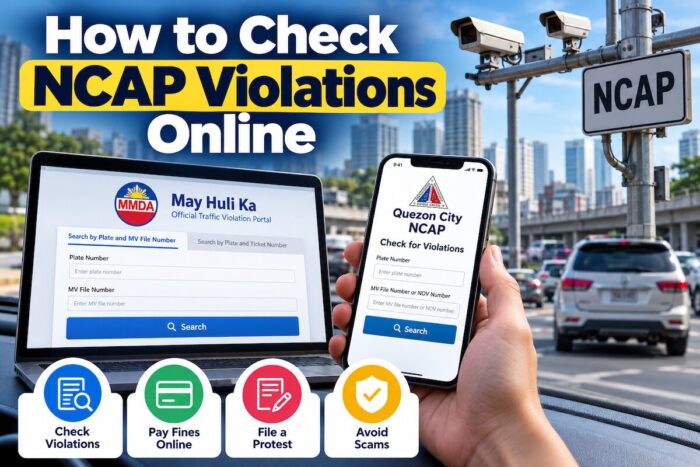
How to Check NCAP Violations Online
The most important step is to identify which agency issued the violation. The Metropolitan Manila Development Authority (MMDA) handles its own traffic enforcement records, while participating local government units (LGUs) maintain their own enforcement processes. A violation recorded by one city may not appear in another city’s portal.
The MMDA’s official May Huli Ka website provides an online violation checker. Quezon City also maintains a dedicated NCAP portal with separate instructions for checking records, paying fines, and filing protests. Motorists should use these official services instead of links sent through suspicious text messages. Official MMDA portal | Quezon City NCAP portal.
NCAP Status Disclaimer (October 2026)
The availability, implementation, and processing of No Contact Apprehension Policy (NCAP) violations may vary by traffic enforcement authority and local government unit (LGU). An official website being accessible does not necessarily mean that its NCAP enforcement or online payment services are currently operational. This guide is for general reference; verify information directly with the MMDA or the relevant city government before taking action. Check the issuing authority’s official announcements for the latest procedures, payment options, protest requirements, and deadlines. Do not assume that a violation has been cancelled, suspended, or dismissed simply because it does not appear in an online portal.
What Is NCAP?
The No Contact Apprehension Policy is a traffic enforcement system that uses CCTV cameras, digital cameras, and other technology to record vehicles committing traffic violations. Instead of requiring a traffic enforcer to stop the vehicle at the scene, the system can capture evidence and generate a notice for the registered vehicle owner.
Depending on the enforcing authority, a violation record may contain the date and time of the incident, the location, the alleged traffic offense, the vehicle details, and information about the corresponding fine.
Receiving an alert does not mean you should automatically pay through a link in a message. Verify the record on the appropriate official website, examine the details, and follow the issuing authority’s procedures if you need to pay or dispute the citation.
How to Check MMDA NCAP Violations Online
The MMDA operates the May Huli Ka portal, which allows motorists to search for traffic violation records associated with their vehicles.
Official website: https://mayhulika.mmda.gov.ph/
The portal provides two main search methods. Motorists can enter their plate number and Motor Vehicle (MV) file number, or, if they already have a ticket, their plate number and ticket number.
Step 1: Visit the official May Huli Ka website
Open the May Huli Ka portal by typing its official address into your browser. Carefully check the domain before entering any vehicle information.
Avoid clicking search ads, shortened links, or links from unknown numbers claiming to represent the MMDA.
Step 2: Prepare your vehicle information
You may need the following details:
- Vehicle plate number
- MV file number from your vehicle’s Certificate of Registration (CR)
- Ticket number, if you have already received a notice
Keep your registration documents accessible. Enter the information exactly as shown on your documents or notice.
Step 3: Choose the appropriate search method
Use the plate number and MV file number to check for associated violation records. If you already have an official ticket, you may use the plate number and ticket number instead.
The portal’s search options may change as the MMDA updates its system. Follow the fields currently displayed on the official website.
Step 4: Review the results
If a record appears, review the violation details carefully. Check the plate number, ticket reference, date, time, location, and alleged offense.
Do not assume that every result is correct simply because it appears online. If the vehicle details or incident information do not match, save a copy of the available information and contact the MMDA or follow its official contestation process.
Step 5: Access payment or contestation instructions
If the violation is valid and you intend to settle it, use the payment options displayed on the official portal. The MMDA portal lists digital payment channels, including GCash, Maya, Bayad App, iCash, and Landbank LinkBizPortal. The site also lists physical payment options.
If you believe the citation is incorrect, review the official contestation procedure before paying. The portal states that you may file a contest with the Traffic Adjudication Division within 10 working days of receiving the Notice of Violation. Confirm the applicable deadline and requirements on the official website.
Reference: MMDA May Huli Ka.
How to Check Quezon City NCAP Violations Online
Quezon City maintains a dedicated NCAP portal. The city government also publishes instructions for checking violations, settling fines, and filing protests.
Official website: https://nocontact.quezoncity.gov.ph/
Step 1: Open the Quezon City NCAP portal
Visit the official website and select Check for Violations.
Step 2: Enter the required details
According to the Quezon City government’s current guide, motorists can use either the MV file number or the Notice of Violation (NOV) number, together with the vehicle’s plate number, to retrieve an NCAP record.
Step 3: Review the violation
Check the information shown on the screen and compare it with your vehicle registration and any notice you received. If you find a discrepancy, record the details before proceeding.
Step 4: Pay through QC eServices if the ticket is valid
The city provides the following online payment process:
- Visit QC eServices and log in or register.
- Select View All Services.
- Find OVR Online Payment / NCAP under Finance and Taxation.
- Select NON-CONTACT APPREHENSION POLICY (NCAP).
- Enter the required vehicle and ticket information.
- Accept the end-user agreement and search for unpaid tickets.
- Select the ticket you want to settle and click Pay Ticket.
- Choose the available payment option and retain the confirmation or official receipt.
The city’s published guide lists GCash, Maya, and PayGate as online payment options. It also provides instructions for printing a payment order for manual settlement at the QC OVR Redemption Center.
Step 5: File a protest if necessary
Quezon City allows motorists to initiate a protest online through its NCAP portal. The city also offers an in-person option at the Quezon City Traffic Adjudication Board on the second floor of the DPOS Building, Quezon City Hall Compound.
Bring the Notice of Violation, your Certificate of Registration, and supporting evidence relevant to your complaint.
For assistance, the Quezon City Traffic and Transport Management Department lists the telephone number (02) 8295-8045.
Reference: Quezon City Government’s guide to verifying and paying NCAP violations.
Where to Check NCAP Violations in Other Metro Manila Cities
The right website depends on the authority that issued the citation. The following table distinguishes official checking services from city websites where research could not independently confirm a dedicated public NCAP checker.
| MMDA | May Huli Ka | Official online checker available |
| Quezon City | QC NCAP portal | Official online checker available |
| Valenzuela City | Valenzuela NCAP portal | Official NCAP website available; confirm current enforcement and processing status with the city |
| Manila | Manila City Government | A dedicated public NCAP checker was not independently confirmed |
| Parañaque | Parañaque City Government | A dedicated public NCAP checker was not independently confirmed |
| Muntinlupa | Muntinlupa City Government | Official NCAP information is published; a separate public checker was not independently confirmed |
| San Juan | San Juan City Government | Official e-services include notice-of-violation and single-ticketing entries; the exact NCAP lookup process should be confirmed with the city |
Important: An official city website or NCAP announcement does not automatically establish that its online checker is currently operational. If you cannot locate a dedicated checking service, contact the city’s traffic management office through its official website. Do not enter your personal or vehicle information into an unverified third-party website.
Can You Check NCAP Violations Through the eGovPH App?
Yes. The MMDA’s NCAP service is integrated into the eGovPH Super App, providing another official way to check MMDA violation records and access related traffic services.
To get started:
- Open the official eGovPH app on your mobile device.
- Locate the MMDA service or search for MMDA NCAP.
- Follow the app’s current instructions for checking vehicle violations.
- Review the available record and payment information.
- Retain any confirmation or reference number associated with your transaction.
Service availability may depend on app updates and the specific transaction. If you cannot find the feature, use the official May Huli Ka website instead.
Reference: Philippine Information Agency: NCAP services on eGovPH.
How to Check NCAP Violations Outside Metro Manila
Motorists travelling outside Metro Manila should not assume that every city uses the MMDA’s May Huli Ka portal. Local governments may operate separate traffic enforcement systems, issue their own notices, or provide different payment and appeal procedures.
To check a possible violation in another Philippine city:
- Identify the city or agency that issued the notice.
- Visit the official LGU website and search for its traffic management office, NCAP, or online violation checker.
- Look for an official announcement confirming the portal and its intended use.
- Prepare your plate number, MV file number, ticket number, or notice reference as required.
- If you can’t verify the portal, contact the relevant traffic office before providing vehicle information or making a payment.
A city government may issue a ticket that does not appear in the MMDA system. Therefore, it’s essential to confirm the correct authority, especially for motorists who regularly travel between cities.
How to Pay a Verified NCAP Fine Online
Once you confirm the ticket is legitimate and the information is accurate, use the issuing authority’s official payment process.
The steps generally involve locating the ticket, reviewing the amount due, selecting an approved payment method, completing the transaction, and retaining the receipt or confirmation number.
However, payment methods vary by authority. Do not assume that an option available through MMDA is also accepted by a city government.
Before paying, confirm the following:
- The plate number and ticket reference match your vehicle.
- The violation details and fine correspond to the official record.
- The payment page belongs to the issuing authority or its authorized payment provider.
- You receive a transaction confirmation or official receipt.
- The ticket status updates after payment, if the portal provides a status feature.
If your payment succeeds but the record still shows an unpaid balance, save your receipt and transaction reference. Contact the issuing authority to request verification rather than paying again immediately.
How to Dispute an Incorrect NCAP Violation
Motorists who believe a citation was issued incorrectly should follow the official protest process for the issuing authority.
Possible reasons to request a review include an incorrect plate number, a vehicle that does not match the evidence, an inaccurate incident location, or circumstances that require further examination.
Prepare a clear explanation and relevant documents. These may include your Notice of Violation, Certificate of Registration, photographs, dashcam footage, location records, and payment records if the matter involves a disputed transaction.
For MMDA violations, consult the May Huli Ka portal for the applicable contestation procedure. For Quezon City citations, use the official QC NCAP portal or consult the city’s published protest instructions.
Observe the deadline stated by the issuing authority. The MMDA portal identifies a 10-working-day period from receipt of the Notice of Violation for filing a contest. Do not assume every LGU follows the exact same administrative procedure.
Keep copies of your submission and any acknowledgment. If you do not receive confirmation, contact the appropriate office and ask how to verify that your protest was received.
How to Avoid NCAP Text Message Scams
Scammers may send alarming messages claiming that a vehicle has an unpaid traffic violation. These messages may imitate government agencies, use threatening language, or include links to fake payment websites.
The MMDA has warned motorists that legitimate NCAP text notifications do not contain payment links. It identifies MMDA_NCAP as its official SMS sender ID and advises motorists to verify violations through the official May Huli Ka portal or eGovPH app.
Follow these precautions:
- Do not click payment links in unexpected traffic violation messages.
- Do not provide your banking password, one-time password (OTP), or other authentication credentials.
- Verify the ticket directly through the official government website.
- Check the sender and domain carefully.
- Save suspicious messages and report them to the MMDA through its official channels.
The MMDA lists Hotline 136 for public inquiries and reporting suspicious messages.
Reference: Philippine Information Agency: MMDA warning on NCAP text scams.
Practical NCAP Checking Checklist
Before completing an NCAP transaction, make sure you have done the following:
-
Identified the agency or city that issued the ticket.
-
Opened the official checking portal.
-
Prepared the correct vehicle and ticket details.
-
Reviewed the date, time, location, and alleged offense.
-
Saved the violation record or notice for reference.
-
Confirmed the payment amount and authorized payment method.
-
Checked the applicable deadline before paying or filing a protest.
-
Saved the official receipt or protest acknowledgment.
-
Avoided links from suspicious messages.
Frequently Asked Questions About Checking NCAP Violations Online
How can I check if my vehicle has an NCAP violation online?
Start by identifying the authority responsible for the possible violation. For MMDA citations, visit the May Huli Ka portal and enter the required plate number and MV file number, or the plate number and ticket number if you already have a ticket. For Quezon City citations, use the dedicated QC NCAP portal. Other local governments may have separate checking procedures. Always use an official government website and verify the details before paying or disputing a citation.
What information do I need to check NCAP violations?
The required information depends on the portal. The MMDA checker supports searching by vehicle plate number and MV file number, or by plate number and ticket number. Quezon City’s published guide lets motorists use the plate number with either the MV file number or the Notice of Violation number. Keep your Certificate of Registration and any notice you received nearby. Enter details accurately, and do not share vehicle documents or personal information on websites whose official status you cannot verify.
Can I check NCAP violations using only my plate number?
Do not assume a plate number alone is enough. The MMDA’s current May Huli Ka portal requires the plate number along with another identifying detail, such as the MV file number or ticket number. Quezon City also requires additional information in its published checking procedure. These requirements help verify that the person searching has the necessary vehicle or ticket details. If you don’t have the required information, check your registration documents or contact the relevant traffic office.
Is the MMDA May Huli Ka portal different from a city NCAP portal?
Yes. The MMDA’s May Huli Ka portal is used for MMDA traffic enforcement records, while local governments may operate their own NCAP systems and handle citations issued under their respective authority. A city-issued citation may not appear in the MMDA portal, and a record in one city’s system may not appear in another. Motorists who travel frequently should identify the issuing authority on the notice and check the appropriate website. If the citation’s source is unclear, contact the relevant government traffic office before paying.
Can I check NCAP violations through the eGovPH app?
The MMDA’s NCAP service has been integrated into the eGovPH Super App. Motorists can look for the MMDA service and follow the app’s instructions to check available violation records and related traffic services. The precise menu and features may change as the app is updated, so use the instructions currently displayed in the app. If you cannot find the service or retrieve your record, visit the official May Huli Ka website directly. Do not use unofficial apps that request sensitive information while claiming to provide government traffic records.
How can I pay an NCAP fine online?
First, confirm the violation through the official portal of the agency that issued it. Review the ticket details and amount, then follow the payment instructions displayed on that website. The MMDA lists digital payment options including GCash, Maya, Bayad App, iCash, and Landbank LinkBizPortal. Quezon City publishes a separate process through QC eServices and lists GCash, Maya, and PayGate for online payment. Available methods can change, so check the portal before paying and retain your receipt or transaction reference.
What should I do if I receive an incorrect NCAP violation?
Do not ignore the notice. Check the vehicle details, date, time, location, and alleged offense against your records. If you believe the citation is incorrect, follow the issuing authority’s official contestation procedure and prepare supporting evidence, such as your Notice of Violation, Certificate of Registration, photographs, or dashcam footage. Check the deadline carefully because procedures can differ between the MMDA and individual LGUs. Keep copies of your submission and any acknowledgment, and contact the relevant office if you need to confirm that your protest was received.
How do I know if an NCAP text message is legitimate?
Treat unexpected payment links with caution. The MMDA has warned that legitimate NCAP text notifications do not include payment links and that its official sender ID is MMDA_NCAP. Do not click suspicious links or provide passwords, OTPs, or banking credentials. Instead, open the official May Huli Ka website independently or use the eGovPH app to verify the record. If the message appears fraudulent, preserve it and report it through official MMDA channels. Other local governments may use different notification procedures, so verify city-specific claims directly with the relevant authority.
What happens if I cannot find my NCAP violation online?
A missing record does not necessarily prove that no citation exists. You may be checking the wrong agency’s portal, entering an incorrect ticket reference, or searching before a record becomes available. Confirm the issuing authority and check the information on your Notice of Violation. If the problem persists, contact the official traffic management office and ask how to verify the record. Avoid repeatedly submitting sensitive information to unfamiliar websites. If your notice has a deadline, do not assume it has been extended simply because the online checker is unavailable.
Do all Philippine cities use the same NCAP checking website?
No. The MMDA operates its own portal, and some local governments maintain separate NCAP websites or online services. For example, Quezon City and Valenzuela have dedicated official NCAP websites, while other cities may publish instructions on their government websites or through their traffic management offices. The availability of an online checker can change, and an official announcement does not guarantee that every transaction is currently available online. Before paying or providing vehicle details, confirm the correct portal through the relevant government website and follow that authority’s procedures.
Official Sources and Government Portals
Use these resources to verify the latest checking instructions and available services:
- MMDA May Huli Ka portal
- Quezon City NCAP portal
- Quezon City guide to verifying and paying NCAP violations
- Valenzuela City NCAP portal
- Manila City Government
- Parañaque City Government
- Muntinlupa City Government
- San Juan City Government
- Philippine Information Agency: NCAP on eGovPH
- Philippine Information Agency: NCAP scam warning
Online checking is the first step in managing an NCAP citation. Confirm the issuing authority, verify the record using official channels, and keep documentation of any payment or protest. If a city portal is unavailable or its current status is unclear, contact the responsible traffic office rather than relying on an unverified third-party service.
Follow #TeamOutofTown on Facebook, Twitter, Instagram, and Pinterest for more travel ideas.
Also read:
- How to Apply for RFID Sticker for SLEX, NLEX, CAVITEX, Etc. (EasyTrip & Autosweep)
- How to Renew Your Motorcycle Registration in the Philippines
- Updated LTO Student Permit Requirements and Procedure 2023
- A Complete Guide to Driver’s License Renewal in the Philippines
- NCAP Cameras in Metro Manila Cities: What Motorists Need to Know
- 10 Things Metro Manila Drivers Should Know About NCAP
- How to Spot NCAP Scams and Fake Text Messages
- 10 Traffic Violations That Can Get You an NCAP Ticket
- How to Contest an NCAP Traffic Violation: Appeals, Deadlines, Fines, and Legal Rights
- How to Pay NCAP Fines Online in the Philippines
















 English (US) ·
  French (CA) ·